Grok Automations is xAI’s latest move toward turning AI from a chatbot into a recurring work agent.
The idea is simple: describe a job once, choose when it should run, and Grok handles it automatically. Instead of asking the same prompt every morning, checking the same information manually, or waiting until you remember a task, users can now create automations that run on a schedule or trigger from incoming emails.
That changes the role of Grok.
A normal chatbot waits for the user. An automation works in the background.
This matters because the next phase of AI will not only be about better answers. It will be about systems that can remember instructions, connect to tools, monitor events, run recurring workflows, and report back when something matters.
Grok Automations sits directly inside that shift.
What Are Grok Automations?
Grok Automations are recurring or triggered jobs that Grok can run on its own.
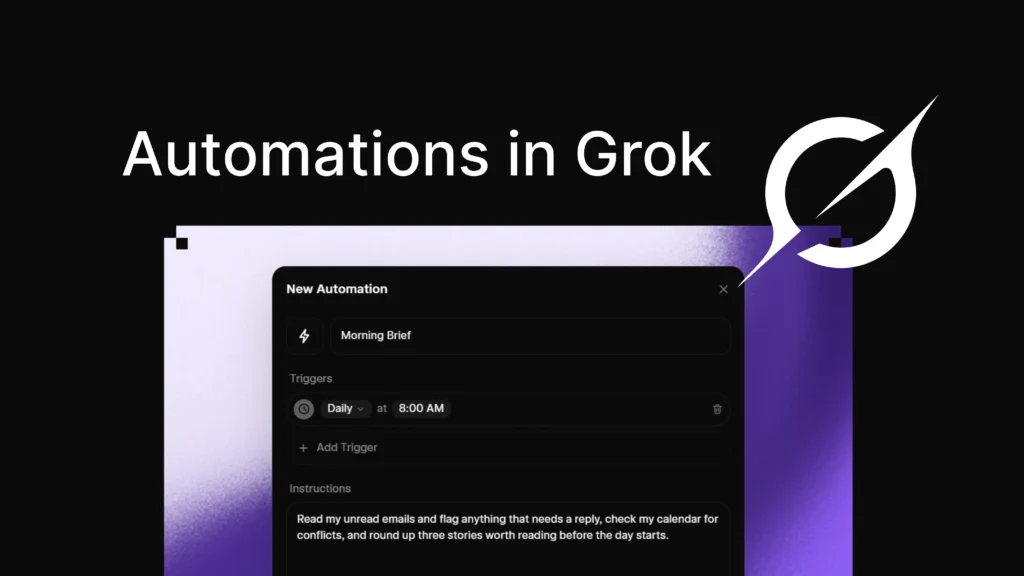
According to xAI, users can describe a job in natural language, choose when it should run, attach files for context, add connectors and skills, and save it as an automation. Each time the automation runs, Grok treats it as a fresh request using the same instructions and current data.
That makes the feature different from a normal saved prompt.
A saved prompt is something you reuse manually. An automation runs without needing you to ask again.
For example, a user might create an automation to:
Summarize unread emails every morning
Track AI news before work
Flag important emails from specific people
Prepare a daily market brief
Monitor competitor updates
Create a weekly content summary
Remind them about rent or recurring deadlines
Review calendar conflicts
Generate a research digest
Summarize new documents from connected tools
The key idea is repeatability.
If a task happens again and again, Grok Automations can help remove the manual step.
How Grok Automations Work
Grok Automations work through instructions, timing, triggers, and reporting.
The user first writes instructions in plain language. These instructions can look like a normal chat request. Then the user chooses how the automation should run.
xAI says schedules can run once, daily, weekdays, weekly, monthly, or yearly at a chosen time in the user’s timezone. Email triggers can also watch the inbox and fire when an incoming email matches filters such as sender, recipient, or subject.
That gives users two main modes:
Scheduled automations
Triggered automations
A scheduled automation runs at a planned time. A triggered automation runs when a specific event happens.
This distinction is important because many real workflows are not time-based. They are event-based.
A morning news summary is scheduled.
An alert for a client email is triggered.
A monthly report reminder is scheduled.
A response to a specific incoming invoice is triggered.
This is what makes Grok Automations more powerful than simple reminders.
Why Grok Automations Matter
Grok Automations matter because they push AI closer to real workflow execution.
Most people still use AI in a manual way. They open a chat, type a prompt, wait for an answer, and copy the result somewhere else. That is useful, but it still depends heavily on the user remembering what to ask and when to ask it.
Automation removes part of that friction.
Instead of manually asking Grok for a daily update, users can set the instruction once. Instead of checking email repeatedly, they can ask Grok to watch for specific messages. Instead of running the same research prompt every week, they can let the automation run on schedule.
This is where AI becomes operational.
The value is not only the intelligence of the model. The value is that the model is present at the right time.
For productivity, timing matters.
From Chatbot to Background Agent
The biggest shift behind Grok Automations is the move from chatbot to background agent.
A chatbot is reactive. It answers when the user asks.
A background agent is proactive. It can monitor conditions, run scheduled jobs, and return with results.
That is a major product direction across the AI industry. OpenAI, Google, Anthropic, Microsoft, and xAI are all moving toward AI systems that can do more than answer isolated questions.
Users do not only want better text generation. They want AI systems that can:
Watch information
Summarize changes
Trigger alerts
Use connected tools
Run repeatable workflows
Prepare reports
Handle routine tasks
Save time without constant prompting
Grok Automations is xAI’s version of that direction.
It gives Grok a recurring role in the user’s workday.
The Role of Connectors and Skills
One important part of Grok Automations is the ability to use connectors and skills.
xAI says users can attach files, add connectors and skills, and mention tools directly with @ so Grok uses them on every run.
This matters because AI becomes more useful when it can access the right context.
A model without connected tools can only answer from the prompt and its available knowledge. A model with connectors can work with current user data, such as emails, documents, calendars, or other connected sources.
Skills also matter because they can package reusable instructions or capabilities.
In practical terms, connectors and skills make automations more specific and more useful.
Instead of saying:
“Summarize my work.”
A user can say:
“Every weekday at 8:00, check my calendar, unread emails, and project files, then summarize what needs my attention today.”
That is a much stronger workflow.
Every Run Becomes a Conversation
Another important feature is run history.
xAI says when an automation runs, Grok opens a real conversation, performs the task, and saves the result in the run history. Users can open any run to read the full thread or continue the conversation from where Grok left off.
This is important for transparency.
If an AI system runs in the background, users need to know what it did, what it found, and how to review the output. Run history makes the automation more accountable than a simple notification.
It also makes the results easier to reuse.
A daily briefing can become a conversation.
A research summary can become a follow-up question.
An email alert can become a drafted response.
A calendar conflict report can become a planning discussion.
The automation starts the work, but the user can continue it.
That is a good model for human-AI collaboration.
Notifications and Reporting
Grok Automations can report back through email, app notifications, both, or neither, according to xAI’s announcement.
This matters because not every automation needs the same level of interruption.
Some tasks should alert immediately.
Some should send an email summary.
Some should stay quiet unless the user checks manually.
Some should only notify when something important happens.
Good automation is not only about doing work. It is about reporting at the right level.
Too many notifications become noise. Too few notifications defeat the purpose.
The best Grok Automations will likely be the ones that balance usefulness with restraint.
Best Use Cases for Grok Automations
Grok Automations could be useful for many types of users.
For professionals, the strongest use cases are daily summaries, email monitoring, meeting preparation, deadline reminders, and project tracking.
For creators, Grok Automations can help monitor trends, summarize audience feedback, prepare content ideas, and track competitor posts.
For researchers, the feature can support recurring news scans, topic monitoring, paper summaries, and update alerts.
For students, automations can provide study reminders, weekly revision plans, deadline alerts, and summarized learning materials.
For business users, Grok can monitor important emails, prepare reports, summarize client communications, and create recurring briefings.
The pattern is simple:
If a task is repeated, scheduled, or triggered by incoming information, it may be a good automation candidate.
Examples of Strong Grok Automations
Here are practical examples of automations users could create.
Daily work brief:
Every weekday at 8:00, summarize my unread emails, calendar events, and urgent tasks for today.
AI news watch:
Every morning, find the most important AI news from the last 24 hours and summarize what matters for developers.
Client email alert:
When an email arrives from a specific client, summarize it and notify me if it requires action.
Weekly content planner:
Every Monday, generate five content ideas based on the latest trends in AI tools and developer productivity.
Meeting prep:
One hour before a weekly meeting, summarize related notes, emails, and calendar details.
Competitor monitor:
Every Friday, summarize major updates from selected competitors and highlight strategic changes.
Invoice trigger:
When an email with “invoice” in the subject arrives, summarize it and flag due dates.
These are simple examples, but they show why the feature matters.
AI is becoming more useful when it is tied to timing and context.
Scheduled Automations vs Email Triggers
Grok Automations has two different value layers: scheduled jobs and email-triggered workflows.
Scheduled jobs are best for routine work.
They are useful when the user knows exactly when the task should happen. Morning briefings, weekly reports, monthly reminders, and recurring research scans fit this category.
Email triggers are different.
They are useful when the timing depends on outside events. A client email, a support request, a receipt, a hiring message, or a security alert can trigger the automation.
xAI says scheduled automations are available to everyone, while email triggers are included with SuperGrok.
That makes the feature accessible at the basic level while keeping more advanced event-driven workflows tied to the paid tier.
Why This Is Important for AI Productivity
AI productivity is often discussed in terms of speed.
How fast can AI write?
How fast can it summarize?
How fast can it answer?
But productivity is not only about speed. It is also about reducing repeated decisions.
Every recurring task creates mental load. Even if a task takes only five minutes, remembering to do it every day becomes friction.
Automation removes that friction.
This is why Grok Automations may be more useful than it first appears. The feature is not only for complex workflows. It can also handle small, repetitive work that drains attention.
A recurring morning brief.
A weekly research summary.
A recurring reminder.
An email watchlist.
These are not glamorous tasks, but they are exactly the kind of work people forget, postpone, or repeat manually.
Risks and Limitations
Grok Automations is useful, but users should be careful.
First, automated AI can make mistakes. A summary may miss context. An alert may overstate importance. A recurring report may include irrelevant information.
Second, email triggers can involve sensitive data. Users should understand what data Grok can access and how connectors are configured.
Third, too many automations can create notification overload. If every automation reports too often, the user gains noise instead of clarity.
Fourth, automations need good instructions. A vague automation will produce vague results. A precise automation will be much more useful.
Fifth, background AI still needs human supervision. Users should not treat automated outputs as final decisions without review.
The right mindset is simple:
Automations should reduce repetitive work, not remove responsibility.
How to Write Better Grok Automation Instructions
A good automation instruction should be specific.
Instead of writing:
“Summarize my emails.”
Write:
“Every weekday at 8:00, summarize unread emails from the last 24 hours. Group them into urgent, needs reply, informational, and can ignore. Only notify me if something requires action today.”
That is much better.
Strong automation instructions usually include:
What to check
When to check it
What sources to use
How to format the output
When to notify
What counts as important
What to ignore
Whether to be brief or detailed
The clearer the instruction, the better the automation.
This is one reason AI automation is becoming a new skill. Users who learn how to define workflows clearly will get better results.
How Grok Automations Compares to Traditional Automation Tools
Traditional automation tools usually require rules, triggers, fields, integrations, and workflow logic.
That can be powerful, but it can also feel technical.
Grok Automations uses a more natural-language approach. The user describes the job like a chat message, and Grok handles the recurring work.
This makes automation more accessible.
However, traditional automation platforms may still be better for strict business processes that require exact logic, structured approvals, audit controls, or complex integrations.
Grok Automations is likely best for flexible knowledge work:
summaries
briefings
monitoring
alerts
research
reminders
context preparation
light workflow support
It is not necessarily a replacement for every automation platform. It is a new layer: AI-powered personal and professional task automation.
The Bigger Picture
Grok Automations is part of a larger trend: AI products are becoming more agentic.
The first phase of consumer AI was chat.
The second phase added tools, files, voice, images, and web access.
The third phase is automation.
In this third phase, AI systems do not only respond. They run tasks, monitor changes, trigger actions, and create recurring value.
This is a major shift because it makes AI less dependent on constant user prompting.
A user does not need to remember to ask for the news.
A user does not need to manually check every email.
A user does not need to repeat the same weekly research task.
The AI becomes part of the rhythm of work.
That is why Grok Automations matters.
Final Thoughts
Grok Automations is an important step in xAI’s effort to make Grok more useful as a daily work agent.
The feature lets users describe a job once, schedule it, trigger it from email, connect it to tools, and review the results in saved conversation history. That moves Grok beyond simple chat and closer to the future of AI agents that can run recurring work in the background.
The feature will not replace human judgment. It will still need clear instructions, careful review, and responsible use of connected data.
But the direction is clear.
AI is becoming scheduled.
AI is becoming triggered.
AI is becoming connected.
AI is becoming part of everyday workflows.
Grok Automations shows how the next wave of AI productivity may work: not just answering questions, but showing up at the right time with the work already done.